

Permission format
Permissions follow the pattern{resource}.{scope}.{action}. The scope determines which specific resource the permission applies to.
Wildcards vs specific IDs
The scope can be either a wildcard (*) or a specific resource ID:
api.*.create_keygrantscreate_keyon all keyspaces in the workspace.api.api_abc123.create_keygrantscreate_keyon only that specific keyspace.
* means “all current and future resources of this type.” A root key with api.*.read_key automatically gains read access to any keyspace created after the key was issued. A key with api.api_abc123.read_key can only read keys belonging to that one keyspace, even if new keyspaces are created later.
You can mix wildcards and specific IDs on the same root key. For example, a key for your billing service might have:
api.*.verify_keyto verify keys across all keyspacesapi.api_billing.create_keyto create keys in only the billing keyspaceratelimit.*.limitto enforce rate limits in any namespace
*) are listed at the top under “Workspace.” Below them, under “From APIs,” each keyspace in your workspace is listed so you can grant keyspace-scoped permissions selectively.
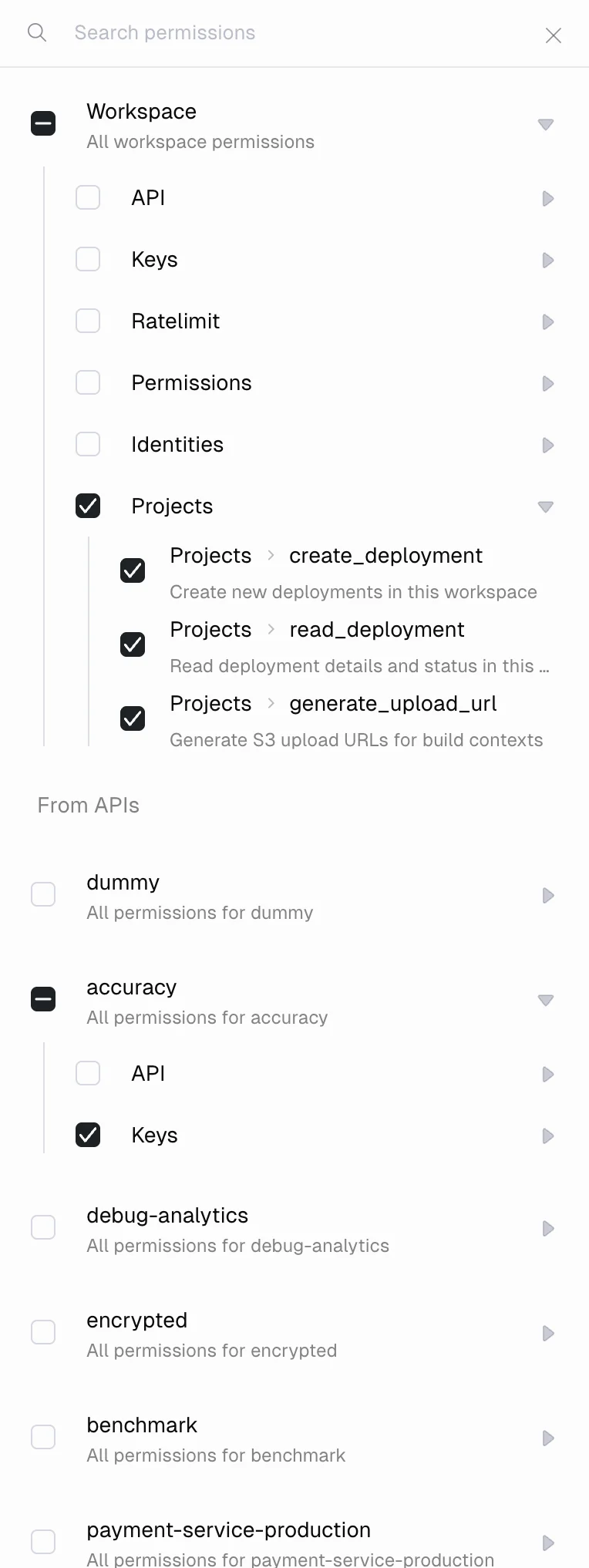
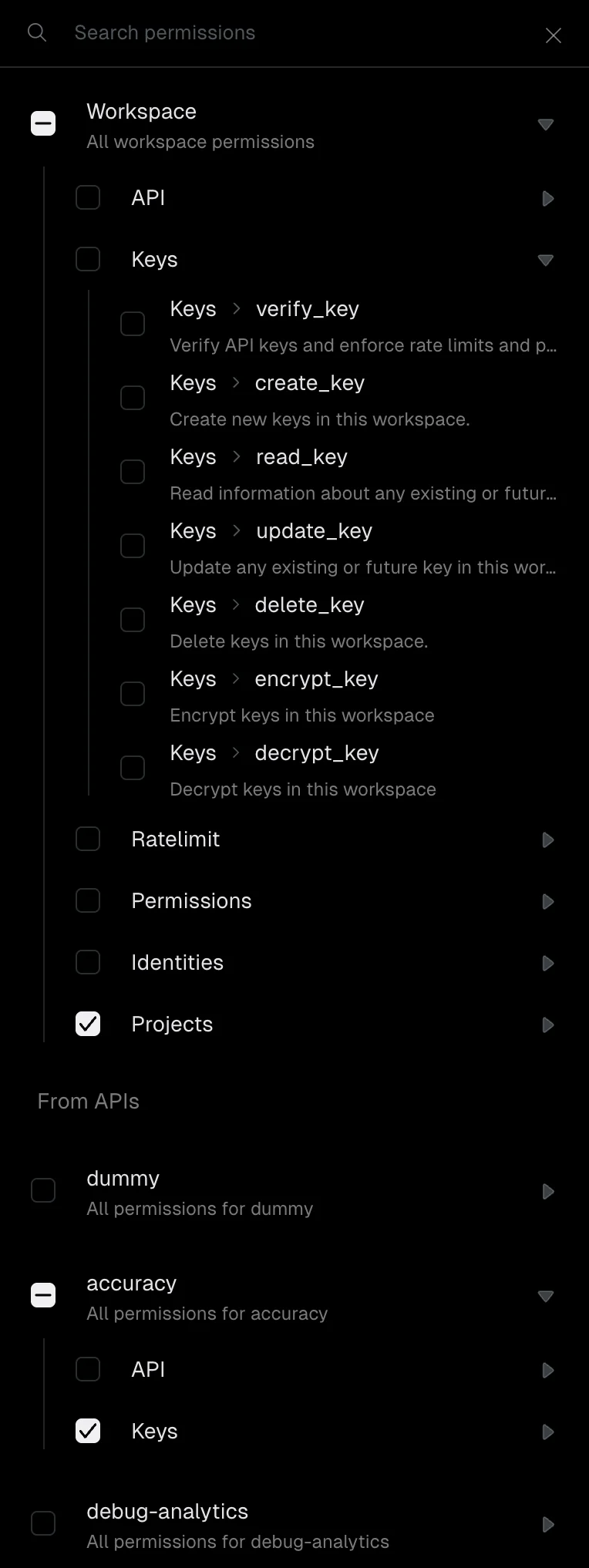
Insufficient permissions
If a root key attempts an operation it does not have permission for, the Unkey API returns a403 Forbidden response with an error indicating which permission is missing. Check the error message to determine which permission to add to the key.
Keyspace permissions
These permissions control management of keyspaces in your workspace.api.*.create_api
Create new keyspaces in the workspace. There is no keyspace-scoped variant of this permission, since the keyspace does not exist yet at creation time.
api.{apiId}.read_api
Read information about a keyspace, including its name, configuration, and settings. Use
api.*.read_api to read all keyspaces.api.{apiId}.update_api
Update a keyspace’s configuration. Use
api.*.update_api to update any keyspace.api.{apiId}.delete_api
Delete a keyspace and all its associated keys. Granting this on a specific keyspace does not grant delete access to other keyspaces. Use
api.*.delete_api to delete any keyspace.api.{apiId}.read_analytics
Query analytics data for a keyspace using SQL. Use
api.*.read_analytics to query across all keyspaces.Key permissions
These permissions control creation, verification, and management of API keys.api.{apiId}.create_key
Create new keys in a keyspace. Use
api.*.create_key to create keys in any keyspace.api.{apiId}.read_key
Read information and analytics about keys, including metadata, expiration, remaining uses, and rate limit configuration. Use
api.*.read_key to read keys across all keyspaces.api.{apiId}.update_key
Update a key’s metadata, rate limits, expiration, remaining uses, or other properties. Use
api.*.update_key to update keys in any keyspace.api.{apiId}.delete_key
Delete keys belonging to a keyspace. Use
api.*.delete_key to delete keys in any keyspace.api.{apiId}.verify_key
Verify API keys and enforce their rate limits and permissions. This is the permission your backend server needs to validate incoming requests from your users. Use
api.*.verify_key to verify keys across all keyspaces.api.{apiId}.encrypt_key
Encrypt keys belonging to a keyspace. Unkey stores API keys as hashes by default. With this permission, you can store an encrypted copy of the plaintext key that can be retrieved later. Use
api.*.encrypt_key for all keyspaces.api.{apiId}.decrypt_key
Decrypt keys belonging to a keyspace. Required to retrieve the original plaintext value of a key that was stored with encryption. Without this permission, you can verify a key but cannot recover its value. Use
api.*.decrypt_key for all keyspaces.Rate limit permissions
These permissions control rate limit namespaces and overrides. All rate limit permissions use theratelimit.* scope.
ratelimit.*.create_namespace
Create new rate limit namespaces in the workspace. Namespaces group related rate limit configurations together.
ratelimit.*.read_namespace
Read information about rate limit namespaces, including their configuration and current state.
ratelimit.*.update_namespace
Update rate limit namespace configuration, such as changing the default limit or window duration.
ratelimit.*.delete_namespace
Delete rate limit namespaces from the workspace.
ratelimit.*.limit
Execute a rate limit check against an identifier. This is the permission your backend needs to enforce rate limits at runtime.
ratelimit.*.set_override
Set a rate limit override for a specific identifier. Overrides let you grant higher or lower limits to individual users or entities without changing the namespace defaults.
ratelimit.*.read_override
Read rate limit overrides for an identifier.
ratelimit.*.delete_override
Delete a rate limit override, reverting the identifier to the namespace default.
RBAC permissions
These permissions control your ability to manage the RBAC system through the Unkey API. They govern who can create roles, define permissions, and assign them to API keys. This is a separate layer from the roles and permissions you define within RBAC itself. For example,rbac.*.create_role on a root key lets you call the API to create a new role, while the roles you create (like “editor” or “viewer”) are assigned to your end-user API keys and checked at verification time.
All RBAC permissions use the rbac.* scope.
Roles
rbac.*.create_role
Create a new role in the workspace. Roles are named collections of permissions that you can assign to API keys.
rbac.*.read_role
Read roles and their associated permissions in the workspace.
rbac.*.delete_role
Delete a role from the workspace. Keys that had this role lose the permissions it granted.
Permissions
rbac.*.create_permission
Create a new permission definition in the workspace. Permissions are the building blocks you assign to roles or directly to keys.
rbac.*.read_permission
Read permission definitions in the workspace.
rbac.*.delete_permission
Delete a permission definition from the workspace.
Key assignments
rbac.*.add_role_to_key
Assign a role to an API key. The key inherits all permissions associated with that role.
rbac.*.remove_role_from_key
Remove a role from an API key. The key loses the permissions that role granted, unless another assigned role also grants them.
rbac.*.add_permission_to_key
Assign a permission directly to an API key, bypassing roles.
rbac.*.remove_permission_from_key
Remove a directly assigned permission from an API key.
Identity permissions
These permissions control identities, which let you associate multiple API keys with a single user or entity. All identity permissions use theidentity.* scope.
identity.*.create_identity
Create a new identity in the workspace.
identity.*.read_identity
Read identity information, including external ID and metadata.
identity.*.update_identity
Update an identity’s metadata or other properties.
identity.*.delete_identity
Delete an identity from the workspace.
Deployment permissions
These permissions control deployment operations. All deployment permissions use theproject.* scope.
project.*.create_deployment
Create new deployments in the workspace. Required for CI/CD pipelines that deploy through the Unkey API.
project.*.read_deployment
Read deployment details and status, including build logs and instance health.
project.*.generate_upload_url
Generate upload URLs for build contexts. Required during the deployment process to upload your application code.
Common permission sets
| Use case | Permissions |
|---|---|
| Verify keys only | api.*.verify_key |
| Create keys for users | api.*.create_key, api.*.read_key |
| Full key management | api.*.create_key, api.*.read_key, api.*.update_key, api.*.delete_key |
| Rate limiting | ratelimit.*.limit |
| Rate limit overrides | ratelimit.*.set_override, ratelimit.*.read_override |
| CI/CD deployments | project.*.create_deployment, project.*.generate_upload_url |
| RBAC management | rbac.*.create_role, rbac.*.create_permission, rbac.*.add_role_to_key |